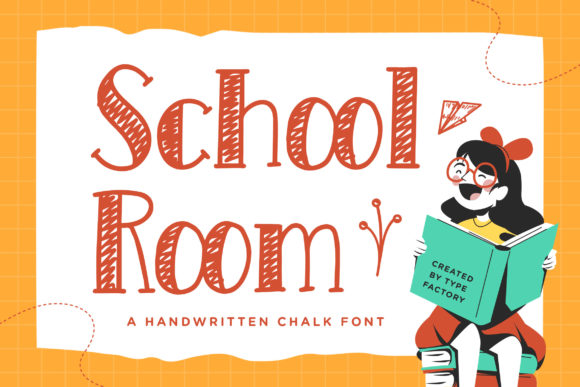
School Room: A Playful Serif Font for Digital Design Projects
School Room in a Kids’ Education Website Redesign
While working on a landing page for a new online tutoring platform targeting elementary school students, I wanted to create a warm, approachable feel without sacrificing readability. I dropped in School Room as the main header font and was immediately drawn to its soft, chalky texture and friendly serif edges. As a serif font with a casual twist, School Room brought a handcrafted charm that felt both educational and inviting—perfect for a brand aiming to feel like a digital extension of the classroom.
Using School Room for Hero Sections and Call-to-Action Buttons
I placed the font in the hero section with a simple headline: “Learning Made Fun.” At 48px on desktop and scaled down to 32px on mobile, the text remained legible, even against a light parchment-style background. The font’s natural contrast and slight texture helped it stand out without competing with the background imagery. For the call-to-action button—“Start Free Trial”—I used a bold version of School Room, which added visual weight without looking cluttered.
What stood out was how the font maintained its personality across screen sizes. On mobile, the letterforms didn’t blur or pixelate, thanks to its clean vector outlines and optimized webfont delivery. I made sure to pair it with a clean sans serif like Open Sans for body text, creating a nice visual balance between playful and professional.
School Room for Craft and DIY Branding Kits
When designing a digital brand kit for a small crafting business, I reached for School Room again. This time, it was for social media headers, product labels, and workshop titles. The goal was to evoke a nostalgic, handmade feel that matched the brand’s artisanal aesthetic. Using the font for titles like “DIY Craft Box: Spring Edition” gave the design a tactile, chalkboard-inspired charm.
One thing I noticed was how well the font worked for short-form digital graphics. It’s not ideal for long paragraphs, but as a display font, it shines in headlines, badges, and image overlays. I tested it over patterned backgrounds and found that using a light drop shadow helped maintain contrast and readability.
Font Pairing Tips with School Room in Web Layouts
Since School Room is a decorative serif, I always pair it with a minimalist sans serif for body copy. This contrast helps establish visual hierarchy and ensures the user’s eye flows naturally from the headline to the supporting content. On a recent blog redesign for a parenting site, I used School Room for article titles and Montserrat for the body text. The result was a clean yet expressive layout that felt both educational and modern.
School Room in Playful Restaurant Menus and Digital Menus
A local café reached out to design a digital menu for their website. They wanted something fun and family-friendly. I tried School Room for menu categories like “Today’s Specials” and “Kids’ Menu.” The chalky texture and casual serif style gave the menu a cozy, school-lunch vibe that matched their branding perfectly.
For digital menus, readability is key. I adjusted line spacing and used a slightly larger font size to prevent crowding. I also tested it on dark backgrounds with white text and found it held up well, though I recommend using a slightly thicker weight if the background is busy or low contrast.
Testing School Room for Online Course Sales Pages
When designing a sales page for a children’s art course, I wanted the typography to reflect the creative and educational tone of the brand. I used School Room for the main headline: “Young Artists: Unlock Your Inner Picasso.”
The font’s personality shone through immediately. It gave the page a youthful energy that felt authentic to the course’s mission. I made sure to test it at different viewport widths and found that it scaled well down to tablet sizes. For mobile, I increased the letter spacing slightly to avoid tight clustering of letters like “rn” or “er” that can blend in smaller sizes.
School Room for Creative Portfolios and Personal Branding Sites
I recently helped a children’s book illustrator redesign her portfolio homepage. She wanted her name to feel like a logo but still be readable and approachable. I used School Room for her site title in a custom color that matched her brand palette. The result was a unique, chalk-inspired logo look without needing actual logo design work.
The font’s texture and serif details added character, and because it’s a font with multiple weights, I could adjust thickness based on layout needs. I also checked the multilingual support and found it covered basic Latin characters, which was sufficient for her English-focused portfolio.
Checking Font Licensing and Web Compatibility for School Room
Before finalizing any project, I always double-check font licensing and file formats. School Room comes with standard webfont files (WOFF, TTF) and is available with commercial use rights, which makes it safe for client work, online stores, and landing pages. I uploaded it through Google Fonts and also tested it via a self-hosted CSS @font-face to compare load times.
It performed well across both methods, though for faster loading, I recommend using only the weights you need. I also checked the font’s alternates and found a few stylistic extras that added nice visual variety for promotional headers and badges.
Final Thoughts on Using School Room in Digital Design
School Room has become a go-to serif font in my toolkit for projects that need a touch of whimsy and warmth. Whether it’s for a school-themed website, a playful restaurant menu, or a creative brand identity, it brings personality without sacrificing usability. It’s best used for short text, headlines, and accents, and pairs beautifully with clean sans serif fonts for a balanced layout.
If you’re a web designer or digital product creator looking for a unique, kid-friendly font that works across platforms and devices, School Room is definitely worth testing in your next project. Just remember to check readability on mobile, pair it wisely, and ensure your licensing is clear before launch.