Hand Gesture Icons: A Unique Dingbats Font for Expressive Editorial Design
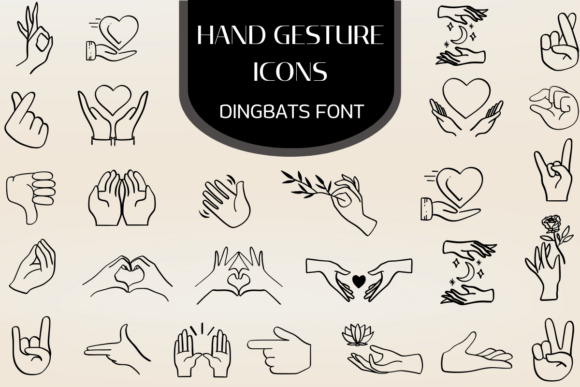
While working on a recent redesign of a digital wellness magazine, I found myself searching for a font that could inject personality into the layout without overwhelming the content. That’s when I discovered Hand Gesture Icons — a professionally organized and expressive dingbats font featuring a diverse collection of illustrative hand symbols. This font includes a wide variety of communicative gestures, making it an ideal choice for visual storytelling in modern editorial design.
Hand Gesture Icons for Digital Magazine Layouts and Visual Storytelling
As a designer who frequently works with digital publications, I’m always looking for fonts that offer both editorial flair and typographic clarity. Hand Gesture Icons is a unique addition to the dingbats category, offering a curated set of hand gestures that can be used to enhance visual communication in magazine spreads, feature pages, and cover designs. The font’s illustrative quality makes it perfect for guiding readers through a layout without the need for additional design assets.
During the magazine layout process, I used Hand Gesture Icons to create visual cues for article transitions and thematic sections. The gestures — from pointing fingers to open palms — added a subtle sense of direction and warmth to the editorial flow. Because the font is professionally designed, each symbol maintains consistent weight and spacing, which is essential for maintaining readability across different screen sizes and formats.
Using Hand Gesture Icons in Newsletter Graphics and Email Headers
For creators and publishers working on branded newsletters, Hand Gesture Icons offers a refreshing way to build personality into email headers and call-to-action elements. As a font-based dingbats solution, it integrates easily into HTML email templates and scales well across devices. I tested it in a lifestyle newsletter header, using a raised-hand symbol to introduce a “Reader Tips” section — it was subtle, recognizable, and helped reinforce the publication’s conversational tone.
Because it’s a vector-based font, Hand Gesture Icons avoids the pixelation issues that can occur with embedded graphics in email design. It also allows for quick color adjustments to match brand palettes, making it a versatile tool for newsletter designers who want to maintain a clean yet expressive visual identity without relying on external image files.
Hand Gesture Icons for Printable Planners and Coaching Workbooks
When designing a printable coaching workbook, I needed a way to visually break up content and highlight key exercises without distracting from the core message. Hand Gesture Icons proved to be an excellent choice for adding gentle visual accents — such as thumbs-up icons for affirmations or open palms for reflection prompts.
Because it’s a dingbats font, the symbols can be resized and styled like any other typeface, which is especially useful in printable formats like PDFs. The font’s clarity at larger sizes made it ideal for worksheet layouts, where visual cues help guide the reader’s attention without being overly intrusive. It also printed cleanly, maintaining its shape and readability in both black-and-white and color print settings.
Font Pairing and Editorial Consistency with Hand Gesture Icons
As a display font, Hand Gesture Icons works best when paired with a clean, readable typeface. For the magazine layout, I combined it with a modern serif font for headings and a minimalist sans serif for body copy. This contrast helped establish a strong visual hierarchy while keeping the content approachable and easy to digest.
When using Hand Gesture Icons in editorial design, it’s important to consider its expressive nature. While it’s perfect for headlines, section dividers, and decorative accents, it’s not recommended for long-form body text or small captions. The font’s illustrative style shines when used sparingly to enhance the layout’s rhythm and mood, rather than dominate the content itself.
What to Consider Before Using Hand Gesture Icons in Commercial Projects
Before incorporating Hand Gesture Icons into any commercial design — whether it’s a digital magazine, branded newsletter, or downloadable planner — it’s important to verify the font’s licensing terms. Most premium dingbats fonts, including this one, offer commercial use permissions, but restrictions can vary depending on how the font is deployed (e.g., embedded in templates, used in client work, or included in digital downloads).
Also, be sure to check for file formats, alternate glyphs, ligatures, and multilingual support. These features can affect how the font behaves in different publishing environments, especially when exporting to PDFs or integrating into web-based design tools. As with any fonts used in professional publishing, test it across platforms and devices to ensure consistent rendering and readability.